By Fahad Murtaza · Published · Updated
What Is an MCP Server? Plain Guide With a WordPress Example
MCP servers went from a niche developer topic to something site owners are asked about every week. Here is what one actually is, without the jargon, and what it looks like when the server is a WordPress site.
An MCP server is a program that exposes a system’s data and actions to AI applications through the Model Context Protocol, an open standard. It publishes a list of tools, each with a name, a description and an input schema, and runs them when a connected AI client asks, returning structured results the model can read.
That is the whole idea. The rest of this post fills in the parts: who talks to whom, what a server can offer, how the messages travel, and a worked example you can follow line by line.
What is MCP, and why does it exist?
MCP stands for Model Context Protocol. Anthropic published it as an open standard, and it is now supported by AI applications from several vendors.
The problem it solves is simple. A language model on its own can only produce text. To do anything useful on a real system (read a file, query a database, edit a page) the application around the model needs a connection to that system. Before MCP, every application built those connections its own way, so each tool had to be integrated once per application.
MCP replaces that with one contract. A system that speaks MCP works with any application that speaks MCP.
Host, client and server
Three roles appear in every MCP setup:
- Host. The AI application you use: Claude Desktop, Claude Code, Cursor, ChatGPT. It runs the model and shows you the conversation.
- Client. A connector inside the host. The host creates one client per server, and each client holds one connection.
- Server. The program that exposes a system. It can be a small local process or a remote service on the web.
The model never talks to the server directly. The model says “I want to call this tool with these arguments”, the host decides whether to allow it (often by asking you), the client sends the request, and the server does the work.
What a server can offer: tools, resources and prompts
An MCP server can expose three kinds of things. The specification calls them primitives.
| Primitive | What it is | Who decides to use it | WordPress example |
|---|---|---|---|
| Tools | Actions with a name, a description and an input schema | The model, usually with your approval | Update a page, list posts, change a product price |
| Resources | Read-only content identified by a URI | The application or the user | A reference document attached as context |
| Prompts | Reusable prompt templates | The user, for example from a slash-command menu | A stored playbook for a common site job |
Tools are the primitive most people mean when they say “MCP tools”, and many servers offer nothing else. A tool definition is small: a name, a plain-language description, and a JSON Schema that says which arguments are allowed.
How the messages travel: stdio and streamable HTTP
MCP messages are JSON-RPC 2.0: a request has a method name and parameters, and the response carries either a result or an error. The protocol defines two standard ways to carry them.
- stdio. The host starts the server as a local process and exchanges messages over standard input and output. Nothing is exposed on the network. This suits tools that work on your own machine.
- Streamable HTTP. The server is reachable at one HTTP endpoint. The client sends each message as an HTTP POST, and the server can answer with plain JSON or keep a stream open for longer work. This suits remote systems, such as a website.
For HTTP servers, the specification describes authorization based on OAuth 2.1. Servers can also accept other credentials sent in a header, and many do. We cover the sign-in side in MCP OAuth explained.
How a client discovers and calls tools
A session follows the same three steps every time.
- Initialize. The client sends
initializewith the protocol version it speaks and what it supports. The server replies with its own version and capabilities: whether it offers tools, resources, prompts. - Discover. The client sends
tools/list. The server returns every tool definition. The host puts those definitions in front of the model. - Call. When the model picks a tool, the client sends
tools/callwith the tool name and arguments. The server validates the input, runs the action and returns the result.
Nothing is hard-coded in the client. If the server gains a tool tomorrow, the client sees it the next time it lists tools. That is the main practical difference from a classic API integration, and MCP vs API goes through it in detail.
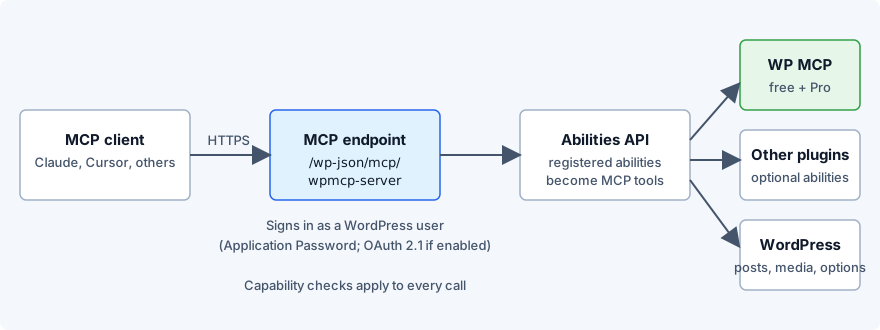
A worked example: a WordPress site as the MCP server
Now make it concrete. WP MCP is a WordPress plugin that turns a site into an MCP server. It runs inside WordPress, is built on the WordPress Abilities API, and serves one endpoint over HTTP:
https://your-site.com/wp-json/mcp/wpmcp-serverYou ask your AI client: “Change the title of the About page to About our studio.”
What the client sees
After initialize, the client asks for the tool list. One entry in the answer looks like this (trimmed to four of its input fields):
{
  "name": "wpmcp-update-post",
  "description": "Partially update a post, page, or custom post type",
  "inputSchema": {
    "type": "object",
    "properties": {
      "post_id": { "type": "integer" },
      "title": { "type": "string" },
      "content": { "type": "string" },
      "status": { "type": "string" }
    },
    "required": ["post_id"]
  }
}
The model now knows a tool exists that updates a post, that it needs a post_id, and that title is an optional string. It does not know the About page’s ID yet, so it first calls a read tool (wpmcp-list-posts) to find it. Say the answer is 42.
What the tool call looks like
The client sends this to the endpoint:
{
  "jsonrpc": "2.0",
  "id": 7,
  "method": "tools/call",
  "params": {
    "name": "wpmcp-update-post",
    "arguments": {
      "post_id": 42,
      "title": "About our studio"
    }
  }
}
What comes back
WordPress checks that the signed-in user is allowed to edit, the plugin saves a snapshot of the page as it was, applies the change and answers:
{
  "jsonrpc": "2.0",
  "id": 7,
  "result": {
    "content": [
      {
        "type": "text",
        "text": "{\"operation_id\":\"3f2a9c1e-7b4d-4e8a-9c2f-5d1e6a7b8c90\",\"post_id\":42}"
      }
    ],
    "isError": false
  }
}
The operation_id is specific to WP MCP, not to MCP in general. It names the snapshot taken before the write. If the new title was a mistake, the agent can call wpmcp-rollback-operation with that ID, or you can click Restore on the plugin’s screen in wp-admin. The protocol itself has no undo: whether a change can be reversed is entirely up to the server, which is why the server you pick matters. MCP security for WordPress covers that side.
MCP server vs plugin vs API
These three get mixed up, so briefly:
- An API is an interface for programs written by developers. A developer reads the documentation and writes code against fixed endpoints.
- A WordPress plugin is code that adds features to a site. It may or may not expose anything to the outside.
- An MCP server is an interface for AI applications. It describes itself at runtime, so the model can work out what to call.
One thing can be all three. WP MCP is a plugin, it is served through the WordPress REST infrastructure, and what it serves is an MCP server.
What an MCP server is not
It is not an AI model, and it does not make your site “intelligent”. It contains no model at all. It is also not a guarantee of safety: a server exposes whatever its author chose to expose, and a connected agent can use all of it within the permissions of the account it signed in with. Read the tool list of any server before you connect it to something you care about.
Client support also varies. With WP MCP, the Claude clients (Claude Desktop, the claude.ai connector, Claude Code) are the most tested path, Cursor works through the standard MCP config, and ChatGPT needs OAuth switched on in wp-config.php first and is not fully tested yet. The WordPress MCP server page lists the details.
Next step
The fastest way to understand an MCP server is to connect one. Install the free plugin from /wordpress-mcp-plugin on a staging site, then follow the Claude Code setup and ask it to list your posts.
See real servers by category in MCP server examples, and how the clients that connect to them differ in MCP clients compared.
For the wire-level detail, read the MCP protocol explained and MCP tools explained.
Common questions
What is an MCP server in simple terms?
It is a program that tells an AI application what it can do on some system and then does it on request. The AI app asks for the list of tools, picks one, sends arguments, and the server runs the action and returns the result.
What is MCP?
MCP is the Model Context Protocol, an open standard first published by Anthropic for connecting AI applications to tools and data. It defines how a client and a server exchange JSON-RPC 2.0 messages to list and call tools, read resources and fetch prompts.
Is MCP only for Claude?
No. MCP is an open protocol and any application can implement a client. Claude Desktop, claude.ai, Claude Code, Cursor and ChatGPT can all connect to MCP servers, although setup and sign-in differ per client. With WP MCP, ChatGPT needs OAuth switched on first and is not fully tested yet.
What are MCP tools?
Tools are the actions a server offers, each with a name, a description and a JSON Schema for its input. The model reads those definitions and decides which tool to call and with which arguments.
Is there any MCP for WordPress?
Yes. WP MCP is a free WordPress plugin that turns a site into an MCP server, built on the WordPress Abilities API. It needs WordPress 6.9 or newer and PHP 8.1 or newer, and it saves a snapshot before every write.
How to add WordPress MCP?
Install the WP MCP plugin, create an application password for a WordPress user, and add the endpoint https://your-site.com/wp-json/mcp/wpmcp-server to your MCP client with that credential. The plugin's Connection screen shows a ready-made config block per client.