WordPress MCP server
How a WordPress MCP server runs on your own site.
WP MCP is a WordPress MCP server: it turns your own install into a full Model Context Protocol server, so agents manage content, plugins, users, media, and the database (and build Elementor pages) from a prompt. It runs inside WordPress on the official Abilities API: no proxy, no SaaS, and a snapshot taken before every single write.
Ready to install? Get the free WordPress MCP plugin, or read the product overview.
Self-hosted · capability-checked · 0 proxies
create-page edit_pages ✓
install-plugin install_plugins ✓
update-user edit_users, admin untouchable ✕
delete-rows needs confirm:true ✕
✓ every write snapshotted · every call logged
Definition
What is a WordPress MCP server?
A WordPress MCP server is software that exposes a WordPress site to AI agents through the Model Context Protocol. It publishes a list of named tools, each with a description and an input schema, and runs them as a WordPress user when a client such as Claude calls them. WP MCP runs that server inside your own install, at /wp-json/mcp/wpmcp-server.
| WordPress REST API | WordPress MCP server (WP MCP) | |
|---|---|---|
| Built for | Code a developer writes in advance | An AI agent choosing tools at run time |
| Discovery | Read the docs, then write the calls | The client lists the tools and their schemas itself |
| Sign-in | Application password, cookie or a plugin | Application password, or OAuth once it is switched on |
| Permissions | WordPress capabilities of the user | The same capabilities, checked on every tool |
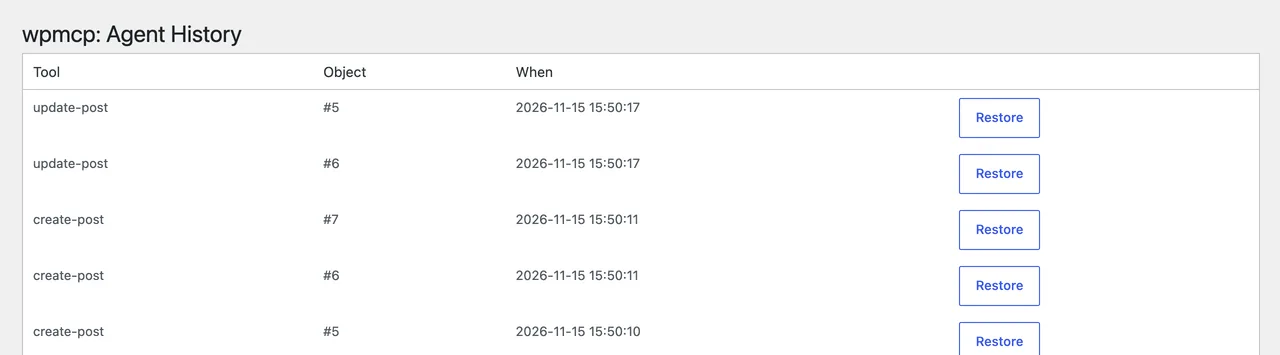
| Undo | Revisions for post content only | A snapshot before every write, one click to restore |
More depth: what an MCP server is,MCP vs API with the same job done both ways, andMCP security for WordPress.
What is a WordPress MCP server?
One server for the whole site.
You
A brief
Plain-language intent, typed into your client.
AI client
Claude · Cursor
Speaks MCP over HTTP or stdio.
WP MCP
The server
Abilities API endpoint on your domain.
WordPress
Your data
Content, store, users, DB, snapshotted first.
WP MCP registers the endpoint at /wp-json/mcp/wpmcp-server through the official WordPress Abilities API and the MCP Adapter. It reaches past the page builder: content and pages, plugins and themes, users and media, WooCommerce, SEO metadata, a read-mostly database and filesystem surface, and read-only performance and security scanners, all on your own server.
The moat
Self-hosted, capability-checked, and reversible.
Other tools let an agent write to a live site. What matters the moment something goes wrong is being able to reverse it. In WP MCP no tool that writes to the database can skip the safety engine, because every mutation is required to route through one orchestrator that snapshots first, applies second, and can restore on demand.
Snapshot before every write
Enforced in code, not by convention. A before-image is captured for the affected post, option, user, comment, or order, that is what one-click restore reads from.
Rollback a change or a session
Undo a single operation, or unwind an entire agent session, from wp-admin or from the agent itself. HPOS- and CPT-safe for WooCommerce.
Governance + audit
A six-layer permission model where each layer only narrows, never widens. Scoped agent identities, and every decision recorded in a governance audit log.
Runs inside WordPress
No Node proxy, no gateway, no copy of your site held off-server. Your data stays self-hosted; we never see your content or your agent's prompts.
Frequently asked
WordPress MCP server: questions, answered.
What is a WordPress MCP server?
It is a server that exposes your WordPress site to AI agents over the Model Context Protocol, the open standard clients like Claude and Cursor use to call tools. WP MCP turns your own WordPress install into that server using the official Abilities API, so an agent can read and write content, media, users, settings, and the database directly, on your domain.
How is this different from the official connector approach?
The official connector is an excellent way to expose WordPress to MCP, built on the same Abilities API foundation. The difference is the safety layer: WP MCP routes every mutating tool through one engine that snapshots the target before it changes, so a single operation or a whole agent session can be restored in one click. The connector focuses on exposing the surface; it does not ship a snapshot-and-restore engine around every write.
Is there an official WordPress MCP server?
The WordPress project publishes the Abilities API in core and an MCP Adapter that developers use to expose their own abilities, and WordPress.com offers MCP access for sites it hosts. WP MCP is an independent, self-hosted server plugin for any WordPress 6.9 or newer site, built on the same Abilities API, with ready-made tools and an undo.
How do I connect Claude to a WordPress MCP server?
With WP MCP, create an application password on the Connection screen and run the one-line claude mcp add command it shows for Claude Code, or download the desktop bundle for Claude Desktop. The claude.ai custom connector signs in with OAuth, which ships off and is switched on with one line in wp-config.php.
Is the WordPress MCP server on GitHub?
Yes. The free plugin is GPL-2.0 and its source and releases are public at https://github.com/wpmcp/wordpress-mcp.
Is it secure to run?
The server runs inside your WordPress, authenticated as a real WordPress user via application password or OAuth. Every ability enforces a WordPress capability check, a six-layer governance model can only narrow what an identity may do, and every decision lands in an audit log. Destructive paths (raw DB writes, guarded code execution, permanent deletes) are off by default.
Does it require Elementor?
No. The server manages core WordPress, posts, pages, media, menus, users, settings, plugins, themes, WooCommerce, SEO metadata, on any theme. Elementor deep editing is an optional Pro capability, not a requirement.
Is there a proxy or SaaS in the path?
No. WP MCP is a single plugin that runs entirely inside WordPress, no separate Node process, no gateway service, no third party holding a copy of your site. The MCP endpoint lives on your own domain and nothing is proxied through us.
Keep exploring
WordPress MCP plugin →
Install and connect in minutes, the fast path.
Integrations →
Dedicated MCP for ACF, Yoast, Rank Math, WooCommerce, and more.
Connect Claude →
Claude Desktop, claude.ai and Claude Code, step by step.
WordPress Abilities API →
The core API the server registers its tools on, explained.
WordPress AI agent →
What an agent can safely do on a site, with examples.
Compare tools →
How WP MCP stacks up against the field on undo and audit.
Go deeper
What is an MCP server? →
Hosts, clients, tools and transports in plain language, with a WordPress site as the worked example.
MCP vs API →
What really differs, when a plain REST API is the better choice, and the same WordPress job done both ways.
MCP security for WordPress →
The real risks of giving an agent write access, the control for each, and a ten-minute checklist.
MCP OAuth explained →
How authorization works for remote MCP servers, and when an application password is enough.
WordPress application passwords →
Create, test and revoke one, and use it to connect an AI client to your site.
Add an MCP server to Claude Code →
Scopes, claude mcp add, .mcp.json and /mcp, with a WordPress site as the example.
Remote MCP servers →
stdio vs Streamable HTTP, how remote servers sign in, the risks, and WordPress as one.
MCP clients compared →
How Claude Code, Claude Desktop, Cursor and ChatGPT differ on transport, sign-in and tool limits.
MCP Inspector for WordPress →
Start it, connect with an auth header, run tools by hand and read the raw JSON-RPC.
The MCP protocol explained →
The handshake, the message types, the three primitives and the transports, with a WordPress site as the example.
MCP tools explained →
How a tool is defined and called, what annotations mean, and how to read a 407-tool catalog by category.
WP MCP 0.8.2 to 0.8.35 roundup →
Thirty-four plugin releases by theme: snippet store, theme builder, restores, sync, WooCommerce and more.