WordPress MCP plugin
Install the WordPress MCP plugin in minutes.
WP MCP is a free WordPress MCP plugin. Install it like any other plugin and your site becomes a Model Context Protocol server on the official Abilities API. Connect Claude, Cursor, or any MCP client and manage all of WordPress from a prompt, with a snapshot saved before every write, so nothing an agent does is ever unrecoverable.
Want the architecture instead of the install steps? See how the WordPress MCP server works, or the overview of WordPress MCP with undo.
GPL-2.0 core · WordPress 6.9+ · ~2 min to connect
$ wp plugin install https://github.com/wpmcp/wordpress-mcp/releases/latest/download/wpmcp.zip --activate
✓ MCP server live at /wp-json/mcp/wpmcp-server
$ claude mcp add --transport http wpmcp …
⛨ snapshot engine armed · rollback ready
✓ Connected · 407 abilities active
What you need
Three things, and you're building.
01 / You
A prompt
Describe the change in plain language to your AI client.
02 / Client
Claude · Cursor
Any MCP-compatible agent, connected over HTTP or stdio.
03 / WP MCP
The plugin
Snapshots, then runs the ability, on the Abilities API.
04 / WordPress
Your site
The change lands, with a Restore button next to it.
Requirements: WordPress 6.9+ (the Abilities API is in modern core), PHP 8.1+, and an MCP client. Elementor is optional, needed only for the Elementor tools. Everything runs on your own server; no proxy, no SaaS in the middle.
Supported on WordPress 6.9 to 7.1. Every release is tested on the oldest and the newest supported WordPress, on a multisite network, and against real installs of the plugins it integrates with. The plugin serves its tools through the officialWordPress MCP adapter, bundled, so there is nothing else to install.
Install and connect
Four steps from zip to first prompt.
01
Install & activate
Drop in the free wpmcp plugin and activate it like any other. It self-registers on the WordPress Abilities API.
02
Enable the server
The MCP endpoint goes live at /wp-json/mcp/wpmcp-server. Reads are on; sensitive writes stay off until you opt in.
03
Connect your client
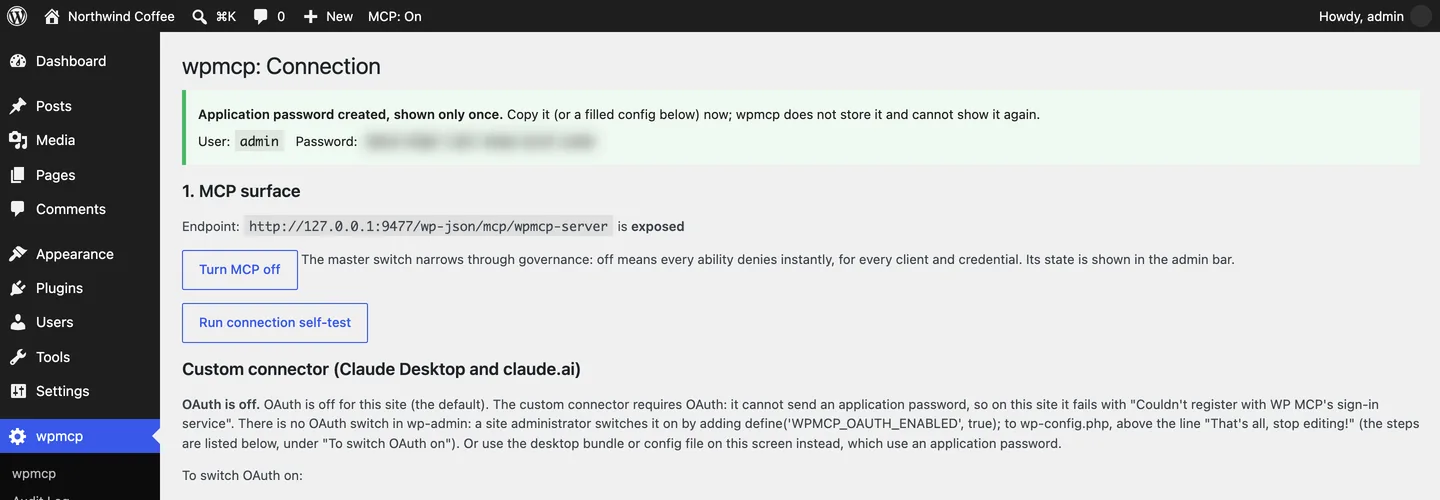
Create an application password on the Connection screen and paste the generated config into Claude Code or Cursor, or download the bundle for Claude Desktop.
04
Prompt
Ask for the change. WP MCP snapshots the target, makes the edit, and leaves you a one-click undo.
Frequently asked
WordPress MCP plugin: questions, answered.
How do I install the WordPress MCP plugin?
Download the free wpmcp zip from GitHub releases, upload it under Plugins, Add New, and activate it. It registers an MCP server on your site over the official WordPress Abilities API. Then open WP MCP, Connection in wp-admin, create an application password there, and paste the generated config into Claude Code, Cursor or another MCP client. Most people are connected in a couple of minutes.
Where is the WordPress MCP plugin download?
The free plugin is distributed from GitHub releases as wpmcp.zip, and the source is public at https://github.com/wpmcp/wordpress-mcp. It is not hosted on a third-party marketplace, so the release page is the place to get it.
Is WP MCP free?
Yes. The core plugin, 274 of its 407 abilities, plus the entire snapshot-before-every-write safety engine and one-click rollback, is free and GPL-2.0, self-hosted forever. Pro adds deep Elementor editing, unlimited history, and guarded execution tools.
What are the requirements?
WordPress 6.9+ (the Abilities API ships in modern core), PHP 8.1+, and an MCP-compatible client. Elementor is optional, it is only needed for the Elementor-specific tools. Everything else works on any theme.
How do I connect Claude or Cursor?
Claude Code and Cursor connect over HTTP with a WordPress application password; the Connection screen creates one and shows a ready-made config block for each client. Claude Desktop uses the desktop bundle from the same screen. OAuth 2.1 (PKCE, with full or read-only access chosen when you approve the client) is included but ships off, and is switched on with one line in wp-config.php. For local development there is a WP-CLI stdio bridge.
Is this the official WordPress MCP plugin?
No. WP MCP is an independent GPL plugin built on the official WordPress Abilities API. The WordPress project publishes its own MCP Adapter for developers who want to expose their own abilities; WP MCP ships ready-made tools for the whole site and a snapshot before every write.
How does it get updates?
Updates arrive on your WordPress updates screen through Freemius once you opt in on the plugin's activation screen; if you skip the opt-in, download the new zip from GitHub releases and reinstall it. Pro licensing runs through Freemius too. Either way the plugin lives entirely on your own server, nothing is proxied through us.
Keep exploring
WordPress MCP server →
How the self-hosted server works, and why it needs no proxy.
WordPress AI agent →
What an agent can safely do with the plugin installed.
Connect Claude →
Claude Desktop, claude.ai and Claude Code, step by step.
Compare tools →
WP MCP vs the other WordPress MCP tools, on the undo question.
Guides for the first hour
WordPress application passwords →
Create, test and revoke one, and use it to connect an AI client to your site.
Build a WordPress site with Claude →
A followable walkthrough: connect Claude, build three pages with real prompts, undo what you do not like.
Undo changes in WordPress →
Revisions, builder history, backups and per-change snapshots: what each one covers and how to restore.
MCP Inspector for WordPress →
Start it, connect with an auth header, run tools by hand and read the raw JSON-RPC.
Claude custom connectors →
Add a WordPress site as a connector: switch OAuth on, approve access, test and undo.
WP MCP 0.8.2 to 0.8.35 roundup →
Thirty-four plugin releases by theme: snippet store, theme builder, restores, sync, WooCommerce and more.