By Fahad Murtaza · Published · Updated
Best WordPress MCP Plugins in 2026: 11 Tools, Compared Honestly
Who is writing this: we make WP MCP, one of the plugins in this list. That makes us an interested party, so this roundup works differently from most. Every tool, ours included, is judged by the same seven criteria. Every statement about another tool comes from that tool’s own WordPress.org listing or GitHub page, linked at the end and last checked on 11 November 2026. Where another tool is the better choice, we say so.
If MCP itself is new to you, read what an MCP server is first. In one line: a WordPress MCP plugin lets an AI client such as Claude, ChatGPT or Cursor read and change your site through named tools, with your permission.
The short version
- You want the official building block: the MCP Adapter, from the WordPress project.
- You want a free, self-hosted, all-round server from WordPress.org: Easy MCP AI, Cowboy MCP or Royal MCP.
- You want the quickest hosted setup across many sites: WPVibe.
- You want chatbots, AI forms and an MCP server in one plugin: AI Engine.
- You want per-role control over what each person’s AI may do: miniOrange MCP.
- You cannot install a plugin on the site: InstaWP mcp-wp.
- You want whole-session rollback and deep page builder editing: WP MCP.
How we chose
We included a tool when it met three tests:
- It is a public MCP server for WordPress as a whole, not an MCP feature added to a single-purpose plugin such as a gallery, a form builder or a cache.
- Its own listing or README describes it in enough detail to check the criteria below.
- We could read that page ourselves on 11 November 2026.
That gave eleven tools: the five we already compare on our alternatives pages, five more general-purpose servers from the WordPress.org directory, and our own. The directory lists many more MCP plugins than this, so treat the list as a starting point, not a census. We did not install and benchmark the other ten tools for this article. This is a comparison of what each one publishes about itself, which is also why it carries no star ratings and no ranking by number.
The seven criteria
- How it connects. OAuth, application passwords, API keys, a local bridge, and which clients the listing names.
- What it can change. Content only, or also settings, users, WooCommerce, files and the database.
- Safety and undo. Confirmation steps, logs, and whether a change can be reversed, by what unit and for how long.
- Builder and plugin coverage. Which page builders and plugins the listing names.
- Free versus paid. What the free version includes. We do not quote other tools’ prices, because they change.
- Where it runs. Inside WordPress, on your computer, or through a hosted service.
- Maintenance activity. The last update shown on the day we checked.
Comparison table: where each tool runs and how it connects
| Tool | Where it runs | Sign-in methods named | Last update seen |
|---|---|---|---|
| MCP Adapter | Inside WordPress | Depends on the transport: HTTP or STDIO | 16 October 2026 (WordPress.org) |
| Automattic wordpress-mcp | Inside WordPress | Not applicable, archived | Archived 17 September 2026 |
| InstaWP mcp-wp | Node.js on your computer | Application password | 10 September 2026 (GitHub) |
| AI Engine | Inside WordPress | OAuth for Claude and ChatGPT | 10 November 2026 |
| Royal MCP | Inside WordPress | OAuth 2.0 with PKCE, API key, application password | 9 November 2026 |
| WPVibe | Plugin plus the hosted WPVibe service | One-click authorisation that creates an application password | 11 November 2026 |
| Easy MCP AI | Inside WordPress | OAuth 2.1, API tokens | 10 November 2026 |
| miniOrange MCP | Inside WordPress, optional miniOrange Gateway | Self-hosted OAuth 2.1 with PKCE | 10 November 2026 |
| Cowboy MCP | Inside WordPress | OAuth, API key | 9 November 2026 |
| Enable Abilities for MCP | Inside WordPress, on top of the MCP Adapter | OAuth 2.1, application password, bearer token | 6 November 2026 |
| WP MCP (ours) | Inside WordPress | Application password, OAuth 2.1 (off by default), WP-CLI stdio bridge | 11 November 2026 (GitHub) |
Comparison table: undo, builders and cost
| Tool | Undo, as its own page describes it | Page builders named | Free versus paid |
|---|---|---|---|
| MCP Adapter | None described; outside its stated scope | None; exposes registered abilities | Free |
| Automattic wordpress-mcp | Not applicable | Not applicable | Archived |
| InstaWP mcp-wp | None described | None | Free to run |
| AI Engine | One-click undo per change, 30-day history | Divi, Avada, WPBakery, SiteOrigin; Elementor and Beaver Builder on Pro | Free MCP server; Pro adds tools |
| Royal MCP | Snapshot before destructive writes, undo within 72 hours | Elementor, Divi | Free |
| WPVibe | Drafts, trash, theme backup, approval for destructive actions; no per-change undo described | Elementor, Bricks, Breakdance, Beaver Builder, Divi | Free plan with a daily allowance; paid plans raise it |
| Easy MCP AI | Change History with before and after snapshots to compare; revision restore | Gutenberg tools; no third-party builder named | Free, all tools included |
| miniOrange MCP | Revision restore, page lock, theme backup and rollback | Elementor, Kadence | Free; some controls on a Business plan |
| Cowboy MCP | Per-change undo journal, seven days by default; database checkpoints | Elementor, Beaver Builder, SiteOrigin | Free, no paid tier |
| Enable Abilities for MCP | None described | Elementor (read, and update element settings) | No paid tier mentioned |
| WP MCP (ours) | Snapshot before every write; restore one operation or a whole session; last 20 operations on free | Gutenberg on free; Elementor, Bricks, Divi, WPBakery, Beaver Builder and more on Pro | Free GPL core; paid Pro |
“None described” means the page we read does not mention the feature. It does not mean the tool cannot do it, and WordPress post revisions still apply to post content on every site.
The tools, one by one
MCP Adapter
Best for: developers and anyone who wants the official layer.
The MCP Adapter is the WordPress project’s own plugin. It bridges the Abilities API, part of WordPress core from 6.9, to MCP over HTTP or STDIO. Its listing is precise about scope: it “is the server and transport layer” and “does not provide any AI features itself”. Exposure is opt-in, so an ability is reachable only when it has been marked public. The listing showed 70,000+ active installations and version 0.7.1.
Pick it if you write plugins, or if you want to choose every tool an agent can see. It is the better choice than WP MCP when you want the smallest official piece and nothing extra. Do not expect ready-made tools or an undo from it; that is not its job. More detail: MCP Adapter compared with WP MCP.
Automattic wordpress-mcp
Best for: nobody starting today.
This was one of the early working MCP servers for WordPress. The repository was archived on 17 September 2026 and its notice says it “is no longer maintained” and “Do not use it for new installations.” It points to the MCP Adapter. We list it because people still search for it. If you run it, plan a move. More detail: what to use now wordpress-mcp is archived.
InstaWP mcp-wp
Best for: sites where you cannot install a plugin, and plain content work across several sites.
mcp-wp is a Node.js server you start with npx -y @instawp/mcp-wp. It runs on your computer and calls the WordPress REST API with a username and an application password. Its README lists tools for content, taxonomies, media, users, comments and plugins, and says one server supports up to 10 sites.
Pick it over any plugin in this list, ours included, when the site owner will not allow a new plugin. The trade-off is reach and safety: it can do what the REST API allows, credentials sit in a local file, and the README describes no undo. More detail: InstaWP mcp-wp compared with WP MCP.
AI Engine
Best for: one plugin for chatbots, AI forms, content generation and MCP.
AI Engine by Jordy Meow is a broad AI plugin with an MCP server inside it. Its listing describes “More than 140 tools”, an MCP server that is free “with no monthly fee and no usage cap”, and an undo that records every change with what it replaced, reversible with one click and kept for 30 days. Its Pro version adds tools for plugins, themes, the database, WooCommerce, Elementor, Beaver Builder, Polylang and WPML. The listing showed 90,000+ active installations.
If you want a chatbot on the front of your site as well as an agent behind it, AI Engine is the better choice than WP MCP, which has neither a chatbot nor a content generator. More detail: AI Engine compared with WP MCP.
Royal MCP
Best for: a self-hosted server on older PHP or WordPress, with a wide integration list.
Royal MCP describes 118 WordPress core tools and 187 integration tools that load when a supported plugin is active. Its listing says it “captures a reverse-state snapshot before every destructive write” and can reverse a tracked change within 72 hours. It requires WordPress 5.8 and PHP 7.4, and showed 10,000+ active installations.
If your server runs PHP 7.4 or 8.0, Royal MCP is a better choice than WP MCP, which needs PHP 8.1 and WordPress 6.9. More detail: Royal MCP compared with WP MCP.
WPVibe
Best for: the fastest setup, and agencies who want many sites behind one account.
WPVibe, from the team behind SeedProd, takes a different route: the plugin connects your site to the hosted WPVibe service, which relays your AI client’s calls to the WordPress REST API. The listing is open about this. It says an application password is created and stored encrypted on WPVibe servers, and that connected sites are unlimited on every plan. It names Elementor, Bricks, Breakdance, Beaver Builder and Divi, a draft workflow for theme files, and an approval panel for destructive operations. The plugin is free and the service has a free plan with a daily allowance of WordPress actions. The listing showed 100,000+ active installations, the largest of the dedicated MCP plugins we checked.
Pick it if you value a 30-second connection and a single panel for client sites, and you are comfortable with a relay holding a credential. Pick a self-hosted plugin if you are not. Its listing describes drafts, trash and a theme backup, but not a per-change undo. More detail: WPVibe compared with WP MCP.
Easy MCP AI
Best for: a free, self-hosted server with strong SEO and analytics tools.
Easy MCP AI by Themeisle runs inside WordPress with “no hosted relay, account or usage fee”. Its listing describes 280+ tools, all in the free plugin, including WooCommerce, six SEO plugins, and tools that pull data from Google Analytics, Search Console and other providers using your own accounts. Security is detailed: OAuth 2.1 with PKCE, per-token permissions and an Audit Log. Its Change History keeps before and after snapshots of what an AI client changed, which you can compare in the admin. The listing showed 40,000+ active installations.
If your work is content, WooCommerce and SEO reporting, and you want everything free from WordPress.org, this is a better fit than WP MCP. The listing does not name a third-party page builder, and it describes comparing recorded changes, not restoring them in one click. More detail: Easy MCP AI compared with WP MCP.
miniOrange MCP
Best for: teams where each person connects their own AI, limited by role.
miniOrange MCP describes 483 tools in 34 categories and builds everything around governance: an Agent Registry that sets, per WordPress role, which tools an agent may use, self-hosted OAuth 2.1, and activity logs. It names Elementor and Kadence. The tools run on your own server; an optional miniOrange Gateway can sit in the connection path. Human approval for sensitive actions and data masking are part of its Business plan. The listing showed 10,000+ active installations.
If your main need is a per-role registry of which tools each person’s AI may use, it is built around exactly that, and is the better starting point.
Cowboy MCP
Best for: a fully free, self-hosted server with undo and no paid tier.
Cowboy MCP states that every tool is free under the GPL, with “no Pro tier, no credit system and no usage cap”. Its safety list is long: safe mode on by default, a dry run for every tool that writes, a per-change undo journal with before-state snapshots kept for seven days by default, and database checkpoints before plugin and theme updates. It names WooCommerce, ACF, Elementor, Beaver Builder and SiteOrigin among its integrations. The listing showed 2,000+ active installations.
If you want undo and will never want a paid tier, Cowboy MCP deserves a look before WP MCP. The differences are the undo window, which is timed, and builder depth. More detail: Cowboy MCP compared with WP MCP.
Enable Abilities for MCP
Best for: adding a ready set of abilities, with on and off switches, to the official adapter.
This plugin by Fabio Montenegro is an add-on, not a separate server: it requires the MCP Adapter and WordPress 6.9. It registers 112 abilities in 21 categories, gives each one a toggle in the admin, and ships an OAuth 2.1 server built for claude.ai custom connectors. Abilities from other plugins appear in the same screen. The listing showed 6,000+ active installations.
Pick it if you have chosen the official adapter and want useful abilities without writing code. Its listing describes an activity log but no undo.
WP MCP (our own plugin)
Best for: letting an agent make real changes on a live site, with a way back for a whole session.
Held to the same criteria:
- How it connects. Application passwords work on a default install. OAuth 2.1 with PKCE is included but ships off, and a site administrator has to enable it, so OAuth-only clients such as ChatGPT take more setup and are less tested than the Claude clients. See the guides for Claude Desktop, Claude Code, Cursor and ChatGPT.
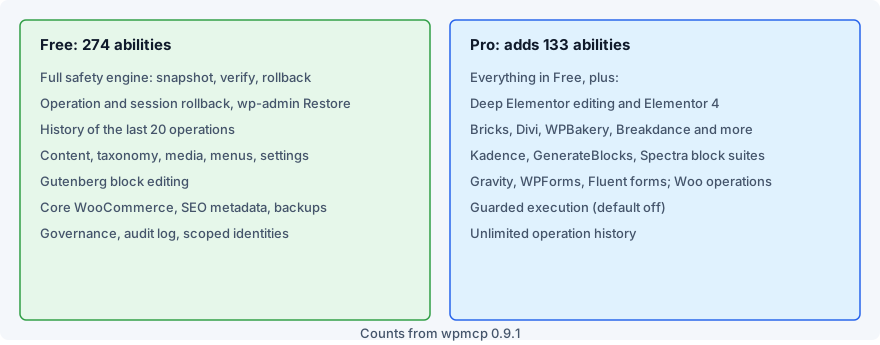
- What it can change. 407 abilities in total: 274 free and 133 on Pro, covering content, media, menus, users, WooCommerce, SEO plugins, forms and page builders. See the integrations.
- Safety and undo. Every write is snapshotted first. You can restore one operation or roll back a whole agent session in one call. History is kept by count, not by time: the last 20 operations on free, unlimited on Pro.
- Builder coverage. Gutenberg on free. Deep Elementor editing and Bricks, Divi, WPBakery, Beaver Builder, Breakdance, Oxygen, Avada, Thrive Architect, Cornerstone and BeTheme are Pro.
- Free versus paid. The core is GPL and free. Pro starts at $49 a year for one site; see pricing.
- Where it runs. Inside WordPress. No relay and no hosted service in the write path.
- Maintenance. Version 0.9.1 was released in November 2026; every release is in the changelog.
Where it falls short: it is not in the WordPress.org directory, so you install and update it from GitHub releases. It needs WordPress 6.9 and PHP 8.1. It is one plugin per site, with no multi-site panel. And the builder tools most people ask about are paid. If any of those is a blocker, one of the tools above will suit you better.
How to choose in five minutes
- Check your versions. On PHP 7.4 or WordPress older than 6.9, your choices narrow to the tools that support them.
- Decide where the server may run. Self-hosted, on your computer, or through a hosted relay. This is a policy question more than a technical one.
- List the plugins and builders the agent must touch. A tool count tells you little; coverage of your stack tells you a lot.
- Decide how you will reverse a mistake. Post revisions cover post content only. Read what each kind of undo covers, then pick a tool whose undo matches the changes you plan to allow.
- Start read-only on a staging copy. Whatever you pick, the security checklist applies.
For a longer look at the four broad approaches, see WP MCP vs the other WordPress MCP tools.
Sources
Every page below was read on 11 November 2026. Figures such as tool counts, install counts and versions are the ones each page showed that day and will change.
- MCP Adapter on WordPress.org and WordPress/mcp-adapter on GitHub, last checked 11 November 2026
- Automattic/wordpress-mcp on GitHub, last checked 11 November 2026
- InstaWP/mcp-wp on GitHub, last checked 11 November 2026
- AI Engine on WordPress.org, last checked 11 November 2026
- Royal MCP on WordPress.org, last checked 11 November 2026
- WPVibe on WordPress.org, last checked 11 November 2026
- Easy MCP AI on WordPress.org, last checked 11 November 2026
- miniOrange MCP on WordPress.org, last checked 11 November 2026
- Cowboy MCP on WordPress.org, last checked 11 November 2026
- Enable Abilities for MCP on WordPress.org, last checked 11 November 2026
- WP MCP: the docs, the changelog and the source on GitHub
If something here is out of date or unfair to a tool, email info@fahdmurtaza.com and we will correct it.
Common questions
What is the best WordPress MCP plugin?
It depends on the job. For the official layer that exposes abilities you choose, use the MCP Adapter. For a free all-round server from the WordPress.org directory, Easy MCP AI, Cowboy MCP and Royal MCP are strong choices. If you also want chatbots and AI forms, AI Engine. If you want whole-session rollback and deep page builder editing, WP MCP, which is our own plugin.
Is there an official WordPress MCP plugin?
Yes. The MCP Adapter is published by the WordPress project and bridges the core Abilities API to MCP. Its listing says it is the server and transport layer and does not provide AI features itself, so what an agent can do depends on the abilities registered on the site.
Are WordPress MCP plugins free?
Most have a free version. According to their own listings, the MCP Adapter, Easy MCP AI, Cowboy MCP and Enable Abilities for MCP are free plugins, AI Engine and miniOrange MCP keep some features for paid plans, WPVibe has a free plan with a daily allowance of actions, and WP MCP has a free GPL core with a paid Pro tier.
Which WordPress MCP plugins can undo what an AI agent changed?
On 11 November 2026 the listings for AI Engine, Royal MCP and Cowboy MCP each describe their own undo, and WP MCP snapshots every write and can roll back one operation or a whole agent session. The time window and the unit of undo differ in each, so read the detail before you rely on it.
Do I need a plugin to use MCP with WordPress?
Not always. InstaWP mcp-wp runs as a Node.js process on your computer and uses the WordPress REST API with an application password, so its core tools need nothing installed on the site. A plugin is needed when you want tools that go beyond the REST API, or safety features that run on the server.
Is the Automattic wordpress-mcp plugin still a good choice?
No. Its GitHub repository is archived and its own notice says not to use it for new installations. It points to the official MCP Adapter instead.
Can I install two WordPress MCP plugins on one site?
Each plugin has its own endpoint, so an MCP client can connect to either. We have not tested these plugins side by side, and two tools writing to the same site make it harder to see who changed what, so try it on a staging copy first.