By Fahad Murtaza · Published
Remote MCP servers: local vs remote, with WordPress
Remote MCP servers: local vs remote, with WordPress as the example
An MCP server can live in two places. It can run on your own machine as a local process that your AI app starts, or it can sit on the internet at a URL. The second kind is a remote MCP server, and it is the kind a website needs.
That choice drives how you connect, how you sign in and what can go wrong. This article explains the two transports, how remote servers authenticate, what the risks are, and how a WordPress site running WP MCP works as a remote server. For the basics of the protocol, read what an MCP server is first.
What is a remote MCP server? It is an MCP server that a client reaches over the network, normally with Streamable HTTP, at a URL such as https://your-site.com/wp-json/mcp/wpmcp-server. The client does not start it. The server is already running, and the client connects, signs in and calls its tools.
Two transports: stdio and Streamable HTTP
The protocol defines the messages, and it defines two standard ways to carry them.
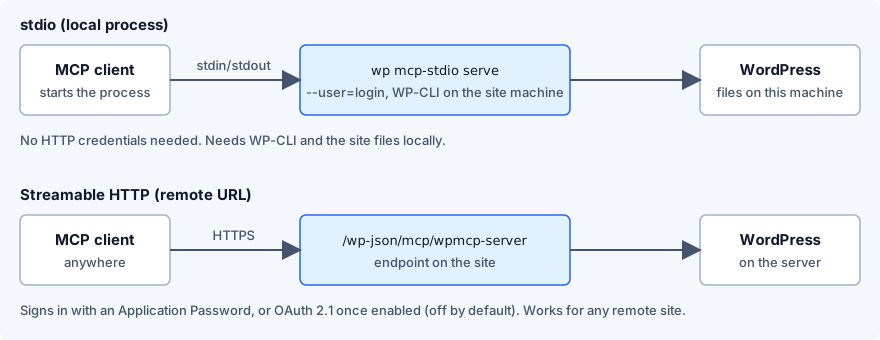
stdio
The client launches the server as a child process and the two exchange JSON-RPC messages through standard input and output. There is no network, no port and no web server. The server runs with your user’s permissions, on your machine.
That makes stdio simple and private, and it limits it to a server you can install locally. It suits a filesystem tool, a local database or a script.
Streamable HTTP
The server listens at a URL. The client sends each message as an HTTP POST, and the server answers with a normal response or, when it needs to send several messages, a stream. One endpoint carries everything.
It replaced the earlier HTTP plus Server-Sent Events design, which used two endpoints. A client or server that only knows the old design may need an update or a bridge. The practical result is that a remote server is now one URL and a set of headers.
Side by side
| stdio (local) | Streamable HTTP (remote) | |
|---|---|---|
| Where it runs | Your machine, started by the client | Anywhere, already running |
| Reached by | Standard input and output | One HTTPS URL |
| Sign-in | None needed; it runs as you | Headers or OAuth |
| Good for | Local files, local databases, scripts | Websites, SaaS, shared servers |
| Main risk | Whatever your user can do | Exposure to the internet, credential theft |
| Works from hosted apps | No | Yes, if the URL is public |
The last row matters. A hosted client such as the Claude apps in a browser, or ChatGPT, makes the connection from the provider’s side. It cannot start a process on your laptop and it cannot reach localhost. Only a remote server on a public address works for them.
Bridges between the two
Some desktop apps only run local servers. Claude Desktop’s config file is one: a url entry is skipped. A bridge is a tiny local stdio server that forwards everything to a remote one. mcp-remote is the common example. The client thinks it started a local process, and the bridge speaks HTTP to the site and can add the Authorization header on the way.
The reverse direction exists too. WP MCP’s wp mcp-stdio serve --user=admin (WP-CLI needs a user to act as) runs the WordPress server as a local process, for a machine with WP-CLI and the site’s files, so a client can use it over stdio with no HTTP credentials at all. If stdio works and HTTP fails, the problem is in the web layer, such as a firewall, a CDN rule or a security plugin, and not in the plugin.
The Claude Desktop guide shows the bridge entry in full.
How remote servers authenticate
A server on the internet must know who is calling. There are two common answers.
A static credential in a header
The client sends the same secret on every request. For WordPress that is an application password, sent as Authorization: Basic followed by the base64 of username:application-password. It is simple, works in any client that can set a header, and ties the connection to one WordPress user with that user’s permissions. You revoke it by deleting the password. The application passwords guide shows how.
The weakness is that the secret sits in a config file, and anyone who gets the file gets the access.
OAuth
OAuth 2.1 is the model the MCP specification describes for HTTP servers. The client discovers the server’s authorization endpoints, registers itself, opens a browser, and you approve. The client then holds a token, not your password, and the token can be limited in scope and refreshed. The MCP OAuth explainer covers the flow.
WP MCP ships an OAuth 2.1 authorization server with PKCE and dynamic client registration, and it is off by default. Clients that use an application password do not need it. Clients that can only sign in with OAuth, such as ChatGPT and the Claude custom connector, need the site owner to switch it on first, with WPMCP_OAUTH_ENABLED in wp-config.php or the wpmcp_oauth_enabled filter. At approval you can grant full access or read-only, or bind the connection to a scoped identity. The custom connectors guide has the steps.
What goes wrong with remote servers
Putting a tool surface on the internet raises real risks. MCP security for WordPress goes through them in detail; here are the short versions.
- A stolen credential is a stolen site. A leaked application password lets someone act as that user. Use a dedicated user with the lowest role that works, rotate the password, and do not commit config files that hold it.
- Broad permissions. An agent acting as an administrator can do what an administrator can. Prefer read-only tokens, scoped identities and a short list of allowed operations.
- Prompt injection. Content the agent reads, such as a comment or a form submission, can contain instructions. Limit what a read-only session can do afterwards.
- No record. If a call is not logged, you cannot say what happened. WP MCP’s Audit Log has a Requests tab with one row per tool call, reads included, plus a Mutations tab for writes.
- No way back. A change you cannot undo makes every mistake permanent.
WP MCP answers the last one at the data layer. Before each supported write it stores a snapshot, then verifies the result and rolls back on its own if the check fails. You can undo one operation or a whole agent session with rollback-operation and rollback-session, or press Restore in wp-admin. Some changes cannot be snapshotted, such as package updates and raw database row writes. Those are off by default, and each response says it cannot be undone.
You can also pin a scoped identity to the IP ranges your agents use. A request from any other address is refused before any tool runs. That helps where the client has a fixed address, and does less for hosted clients whose addresses vary.
A WordPress site as a remote MCP server
The mechanics are short.
- Install WP MCP and activate it. WordPress 6.9 or later and PHP 8.1 or later are required.
- The endpoint is mounted on the site’s REST API at
/wp-json/mcp/wpmcp-server. It is served through the official WordPress MCP adapter, which the plugin bundles. - Create an application password on the WP MCP Connection screen.
- Point a client at the endpoint with the Basic header, or switch OAuth on and add it as a connector.
The server speaks MCP revisions 2025-11-25 and 2026-07-28 on both the HTTP endpoint and the stdio bridge. A client that uses the older revision runs the usual initialize session. One that uses the newer revision calls server/discover and tags each request, with no session. You do not choose; the server answers whichever the client sends.
A site with 407 possible tools is a large surface. The free plugin has 274 of them and Pro adds 133, with the exact set depending on which plugins are active. The optional compact mode advertises five tools to keep the list small for clients that count tokens or cap tools. The MCP clients comparison shows how that matters per client.
To see what the endpoint returns without an AI app in the way, use MCP Inspector with the same URL and header.
A checklist before you expose one
- The site runs HTTPS with a valid certificate.
- The connected user is dedicated and has the lowest role that works.
- You started with read-only access and widened it on purpose.
- Application passwords are named, so you can see and revoke each one.
- Destructive tools stay off until you need them.
- You know where the undo is, and you tried it once on a draft.
- A caching layer or security plugin is not blocking the REST route or the
.well-knownpaths, if you use OAuth.
For what the plugin exposes, see the WordPress MCP server page. Pro adds deep page builder editing and more, and its plans are on the pricing page.
The message flow behind both transports is in the MCP protocol explained.
Common questions
What is a remote MCP server?
A remote MCP server is one a client reaches over the network at a URL, usually with Streamable HTTP, instead of starting it as a local process. A WordPress site that runs an MCP plugin is a remote server, with its endpoint on the site's own domain.
What is the difference between stdio and Streamable HTTP?
With stdio the client starts the server as a child process and exchanges messages on standard input and output, so it runs on your machine. With Streamable HTTP the server sits at a URL and receives each message as an HTTP request, so it can run anywhere.
Is Streamable HTTP the same as SSE?
Streamable HTTP replaced the older HTTP plus SSE transport. A server can still answer with a stream when it needs to, but the single HTTP endpoint is the current design. A client that only knows the older transport may need an update or a bridge.
How does a remote MCP server authenticate clients?
The MCP specification describes OAuth 2.1 based authorization for HTTP servers, and many servers also accept a static credential in a header. WP MCP accepts a WordPress application password as a Basic header, and offers OAuth 2.1, which is off by default until the site owner sets WPMCP_OAUTH_ENABLED or the wpmcp_oauth_enabled filter.
Are remote MCP servers safe?
They are as safe as their authentication, their permission model and what an agent can change. Use HTTPS, a dedicated low-privilege user, read-only access where possible, a log of requests and an undo path for writes. Treat a remote MCP credential like any other standing credential.
Can I run a WordPress MCP server locally instead?
Yes, on a machine that has WP-CLI and the site's files. WP MCP ships a stdio bridge, wp mcp-stdio serve --user=<login>, which needs no HTTP credentials because the client runs it as a local process. The HTTP endpoint is the route for anything remote.