The Safety Model
This is the part of wpmcp that the rest of the product exists to support. Every tool that mutates existing data routes through a single orchestrator, Safe_Mutation::run(). No exceptions, and this is enforced in code: a tool cannot write to a post or option except by calling this method.
The snapshot -> apply -> verify -> rollback flow
snapshot (before)  ->  apply the change  ->  verify  ->  ok?
     |                                          |         |
 stored in                              on failure:    return
 wp_wpmcp_snapshots                     auto-rollback   operation id
(keyed by operation + session) + raise error- Snapshot. Before the mutation runs,
Snapshot::capture()records the target’s before-image andSafe_Mutationstores it, gzip-compressed, in thewp_wpmcp_snapshotstable, keyed by a generated operation ID (a UUID) and the calling session’s ID. - Apply. The tool’s actual mutation callback runs (e.g.
wp_update_post(),update_option(),wp_delete_post()). - Verify (optional, tool-specific). Some tools pass a verification callback.
update-blocks, for example, checks that the new block markup still parses as valid Gutenberg blocks. If verification fails,Safe_Mutationimmediately restores the snapshot and throws aMutation_Failedexception, so a bad write never survives past the same request. - Rollback, on demand. Separate from the automatic verify-and-revert above, any successfully-applied operation can be undone later via the
rollback-operationorrollback-sessiontools, or from the wpmcp wp-admin screen.
Every write tool returns an operation_id in its response specifically so a caller (human or agent) can reference it later for rollback.
What gets captured
Snapshot capture is dispatched by object type (src/Safety/Snapshot.php). The core types are post, option, user, comment, term and wc_order, and the integrations add their own (listed below). This is what makes product edits, order changes, comment edits, menu edits, page builder layouts and plugin data undoable through the same engine as posts and settings, not a separate one-off mechanism per domain.
Posts (and attachments, which are WordPress posts of type attachment):
- The full post row, every column from
get_post($id, ARRAY_A), not a hand-picked subset of fields. This matters for the resurrection path below: a partial capture would mean a force-deleted post comes back missing its original post type, author, parent, slug, dates, or menu order, silently rebuilt fromwp_insert_post()’s defaults. - All post meta (
get_post_meta($id)), every key and value. - Taxonomy term assignments, captured per taxonomy registered on that post type via
wp_get_object_terms(). - Comments and their comment meta, captured only for use by the force-delete resurrection path (see below). WordPress’s
wp_delete_post($id, true)destroys comments and commentmeta with no equivalent in the trash or in-place-update paths, so they have to be captured up front to be restorable.
A WooCommerce product is a post (post_type = product) and a navigation menu item is a post (post_type = nav_menu_item), so update-product, delete-product, update-menu-item, and remove-menu-item all restore exactly through this same full-row-plus-meta-plus-terms path: price, stock, description, title, url, parent, and position all come back as they were.
Options (used by update-settings and assign-menu-to-location):
- The option’s current value.
- Whether the option existed before the write. Options have no trash/soft-delete equivalent: a write either changes an existing value or introduces a brand-new option. Recording
existedlets rollback choose between putting the old value back (update_option()) or removing the option entirely (delete_option()) if it wasn’t there before.
Users (used by update-user):
- The user’s core profile fields and all usermeta, captured before any change so
rollback-operationrestores display name, email, url, nickname, name fields, and description exactly. Role and password are never touched by any wpmcp tool, so neither is part of this capture.
Comments (used by moderate-comment, edit-comment, and delete-comment):
- The comment row and its comment meta.
delete-comment‘s resurrection path reinserts the comment viawp_insert_comment(); the content, author, dates, and post association are restored, but (like force-deleted posts’ comments) the comment gets a new auto-increment ID, since WordPress core does not let a caller choose one.
WooCommerce orders (used by update-order-status):
- The order’s prior status, captured via the
wc_orderobject type so it is HPOS- and CPT-safe (it does not assume orders are stored as posts).rollback-operationrestores the exact prior status.
Integration snapshot types
- Page builders. WPBakery, Avada, Divi, Bricks, Beaver Builder, Breakdance, Oxygen 6, classic Oxygen and Thrive Architect all keep their layouts in
post_contentand post meta, so a builder write is an ordinarypostsnapshot and rolls back exactly. The rollback path then refreshes or invalidates the builder’s generated CSS the same way a forward write does. - WooCommerce (Pro catalog).
wc_order_full(a whole order, fororders.update),wc_shipping_zone(a whole zone with its methods),wc_webhook,wc_tax_rate, andoptionfor a payment gateway’s settings or a store setting. Creates record a creation row so rollback removes exactly what was created. - Plugin tables.
db_rowsfor a form entry’s status in the plugin’s own table (Gravity Forms, WPForms, Fluent Forms),plugin_table_rowsfor Pods table storage and TranslatePress dictionary rows,buddypress_rowsfor BuddyPress,redirection_itemfor Redirection redirects, andaioseo_rowfor All in One SEO. Restoring a raw table row is an administrator action. - Structure.
acf_structurefor ACF field groups, post types and taxonomies (keyed by the ACF key, so a create and its undo agree on what was created),acf_optionsfor ACF options pages,option_setwhen a theme settings write spans two options, andtheme_scaffoldfor a scaffolded child theme.
Some writes cannot be snapshotted and say so with recoverable: false rather than implying an undo that does not exist: a WooCommerce refund (the status comes back, the money does not), WooCommerce system status tools, the W3 Total Cache purge and the LiteSpeed Cache targeted purge, Forminator and SureForms entry deletes, an UpdraftPlus backup run, running an Action Scheduler action now, and the FluentSMTP and Post SMTP test sends. All of them except the purges are also off by default and need confirm: true.
Personal data in snapshots
A snapshot is a verbatim before-image, so some snapshots hold personal data. wpmcp treats restoring one as the same privilege as reading it:
- Comments and reviews. Restoring a comment snapshot needs
moderate_comments, the capability that reading a commenter’s email and IP takes; restoring a product review also needsedit_producton its product. Change sets and the history screen never show a commenter’s email, IP address or browser details. - Posts with comments. Rolling back a deleted post as a user without
moderate_commentsbrings the post and its comments back, with each commenter’s email, IP and user agent left blank, and the rollback response says so. - Other personal data. A payment gateway settings snapshot holds its credentials, so restoring it takes
manage_woocommerce. A Flamingo entry snapshot takesedit_users. BuddyPress and raw table snapshots takemanage_options. - Lists are masked, single reads are not. A list or export returns many people’s data in one call, so WP MCP masks the personal part on the server before it reaches the model: an email keeps its first character and its domain (
j***@example.com), and a name, phone, IP or free-text field keeps its first character. This covers users, comments, forms entries, CRM, LMS and membership lists, Elementor Pro submissions, helpdesk tickets, activity and email logs, Wordfence lists, Action Scheduler args and Site Reviews, and the response saysmasked: true. A single-record read still returns the full value, under the capability its tool already requires. - Credentials in option reads. The generic readers (
get-option, the response ofupdate-option, andwp_optionsrows from the database query tool) pass every value through one central registry of secret options, so a credential a plugin’s own settings read hides cannot be read in plain text from another tool. Registered options are masked whole or key by key, including values stored as JSON or serialized text inside an option, and any option nobody registered still has keys named like an API key, secret, password, token or license key masked. Only the returned copy changes: the stored option and its snapshot stay raw, so a rollback restores the exact credential, and a masked value written back unchanged keeps what is stored. - Reversible is not erased. Because a deleted form entry can be restored, a copy stays in the snapshot history until it is pruned. A reversible delete is not a GDPR erasure, and the ops that do it say so.
Rollback on shared data
Some objects keep changing after an agent writes to them, because other people use the site. BuddyPress is the clearest case: members join groups, reply to activity and trigger notifications. A BuddyPress write records every row it and BuddyPress’s own hooks created, and its rollback restores only the rows it saved, by id. It removes only the rows the write itself created, keeps membership requests, notifications and replies that other members added after the write, keeps reply numbering in a thread consistent, and leaves in place, and reports, any created row that has since changed hands. The same principle applies elsewhere: rolling back a WooCommerce shipping zone create removes the zone only while it is still the zone that was created, and undoing a Redirection create never removes a different redirect that took its place.
Snapshots are serialized with gzencode(wp_json_encode($before)) and stored in a LONGBLOB column.
Operation rollback vs session rollback
Two distinct undo scopes, both backed by the same snapshot table:
rollback-operationrestores exactly one snapshot, identified by itsoperation_id. Simple: look up the row, apply that snapshot.rollback-sessionunwinds an entire agent session. It pulls every snapshot recorded under asession_id, walks them oldest-first, and for each distinct object restores only the earliest snapshot seen, that object’s state from before the session touched it at all. If the same post was edited three times in one session, only the first (pre-session) snapshot is applied; the two later ones are skipped once the object’s identity has already been restored. The tool’s return value (restored_count) counts snapshot rows processed, not distinct objects restored, so it can be larger than the number of objects that actually changed.
Object identity for deduplication is object_type:object_id for posts, users, comments, and orders, and option:<option name> for options (the raw database object_id column is always 0 for option rows, since options are identified by name, not a numeric ID; the real name lives inside the serialized blob).
The meta-purge
Rollback is a full restore, not an additive merge. If the mutation being undone added a new meta key that did not exist at snapshot time, a rollback that only restored the snapshotted keys would leave that new key behind as orphaned meta, i.e. the object would not be truly back to its pre-mutation state.
To prevent that, Rollback_Service::apply_snapshot():
- Diffs the object’s current meta against the snapshotted meta.
- Deletes any meta key present now but absent from the snapshot (added by the mutation being undone).
- Deletes and re-adds every snapshotted key/value pair exactly as captured.
This is what makes rollback exact rather than approximate: a restored object matches its pre-mutation state, including the absence of anything the agent added.
Force-delete and resurrection, with ID verification
Trashing a post (delete-post without force: true) is not routed through Safe_Mutation at all: WordPress’s own trash already makes it reversible, so a redundant snapshot would buy nothing. Force-deleting (force: true) permanently removes the post row, so that path is safe-wrapped.
When a force-deleted post needs to be rolled back, the row no longer exists, so a plain wp_update_post() would silently no-op. Instead, Rollback_Service re-inserts the post at its original ID using wp_insert_post()’s import_id parameter, then replays the captured comments on top of it via wp_insert_comment() (comment IDs themselves cannot be preserved, WordPress core always assigns a new auto-increment comment ID, but content, author, dates, and thread association with the post are restored).
Two safety checks guard this resurrection path:
- Identity check before choosing the restore path. If a post already exists at the target ID, wpmcp does not assume it’s safe to just update it in place. It compares
post_date_gmt(immutable after creation) between the live row and the snapshot. If they don’t match, the row at that ID is a different post that has since reclaimed the ID (e.g. someone manually re-imported content after the original was force-deleted), and blindly updating it would silently overwrite an unrelated post. In that case rollback routes through the resurrection path instead, which triggers the next check. - ID collision check after resurrection.
wp_insert_post()’simport_idis only honored if that ID is still free; on a collision it silently falls back to a new auto-increment ID instead of erroring. wpmcp checks the returned ID against the ID it asked for, and if they don’t match, throws aMutation_Failedrather than leaving a “restored” post sitting at the wrong ID with no error. A rollback that silently succeeds at the wrong ID would be worse than one that fails loudly.
Known limitations, stated honestly
Free-tier history retention bounds session rollback, by whole runs. Snapshot_Store::history_limit() returns 20 by default; the wpmcp_snapshot_history_limit filter raises or lowers that number on any site at no cost, and the Pro build adds that filter itself, returning unlimited (PHP_INT_MAX) while the licence is active. After every write, Safe_Mutation::run() calls Snapshot_Store::prune(), which trims the table back toward that limit. Pruning is session-aware: a bulk run recorded under one session is kept or dropped as a whole, never cut in the middle, and the most recent run is always kept whole however large it is, so it stays fully undoable with rollback-session. A single write that would itself exceed the limit holds pruning until it finishes, and the next write outside the hold prunes as usual, by whole sessions. What the cap means in practice on a free-tier site: once newer runs have pushed an older session out of the table, rollback-session for that session is refused with the reason, instead of silently undoing only the part that survived. Pro sites keep every session while the licence is active, and if a licence ends the history is held at its current depth until the owner trims it or sets a depth, so a lapse never deletes undo points on its own.
Media force-delete does not restore file bytes. Force-deleting an attachment (or deleting one without MEDIA_TRASH defined) permanently unlinks the physical file from disk. Rollback via Safe_Mutation restores the media’s database record faithfully, the post row, all meta, and taxonomy terms, but it cannot restore bytes already deleted from the filesystem. The delete-media tool response signals this explicitly with "files_recoverable": false and a warning field pointing at the tracking issue. Full file-level recovery is tracked as issue #24 and is not yet implemented. Because of this, delete-media is disabled by default: a site must opt in via the wpmcp_enable_delete_media filter, and every call additionally requires confirm: true.
Note on wording: an earlier design-spec draft stated that snapshot capture does not record taxonomy terms. That is now out of date. The current Snapshot::capture() implementation does capture per-taxonomy term assignments for posts, and Rollback_Service::apply_snapshot() restores them via wp_set_object_terms(). What is genuinely not yet captured is a small set of secondary post fields not covered by the full-row capture’s practical use today (the design intentionally captures the entire row, so this gap is narrower than earlier drafts suggested); consult src/Safety/Snapshot.php directly if you need the exact current field list, since this is an area still evolving.
Driving rollback
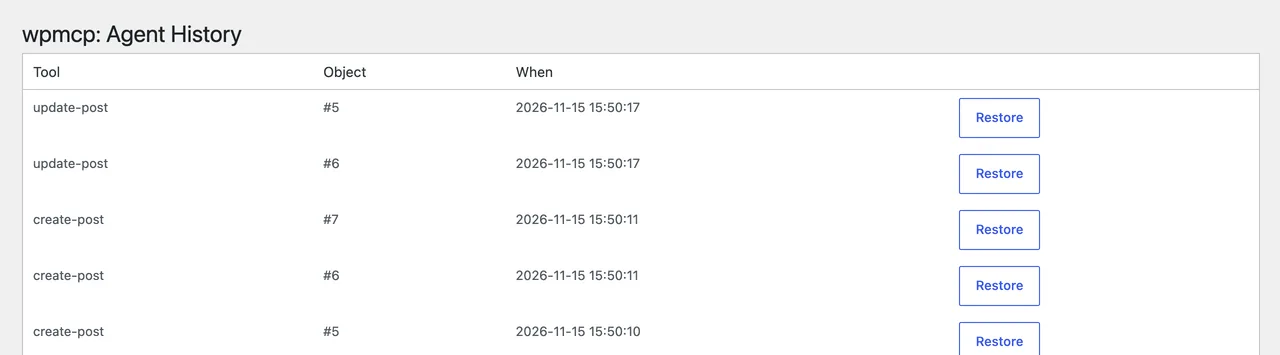
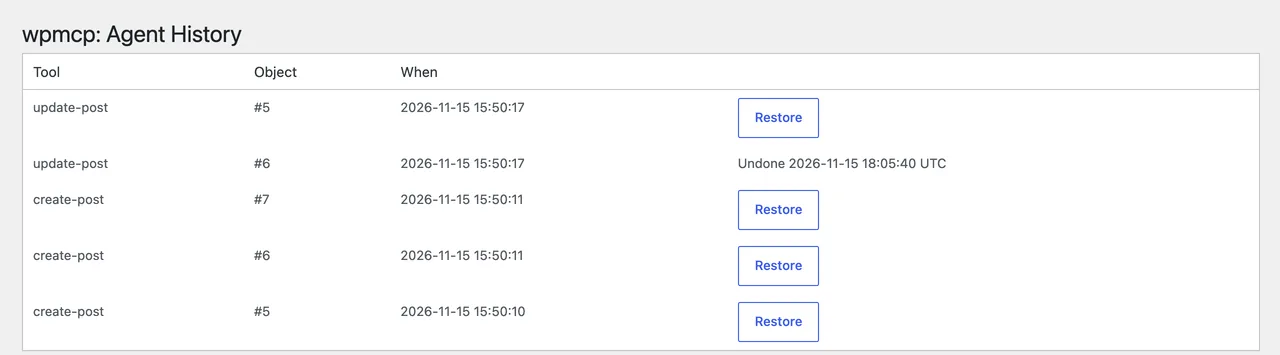
- From an agent: call the
rollback-operationorrollback-sessionMCP tools directly (see Tools reference). - From a human: open the wpmcp screen in wp-admin, which lists recent operations (via the same
list-operationsdata) with a one-click Restore button per row.
Previous: Connecting an MCP ClientNext: Tools ReferenceAll documentation